
Booking software
Open process
Open process

Open process in the system

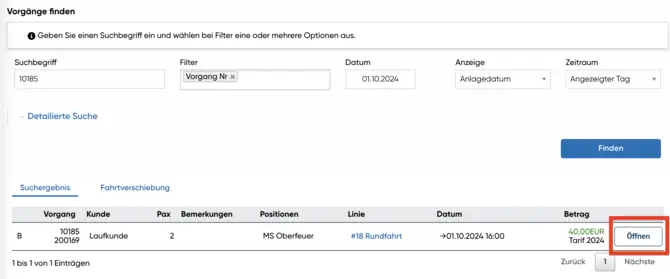
To subsequently assign a customer to a booking, you must first search for the corresponding transaction in the system. Then click on "Open" to display the details of the transaction. This gives you direct access to all the relevant information you need for the assignment.

Select payment

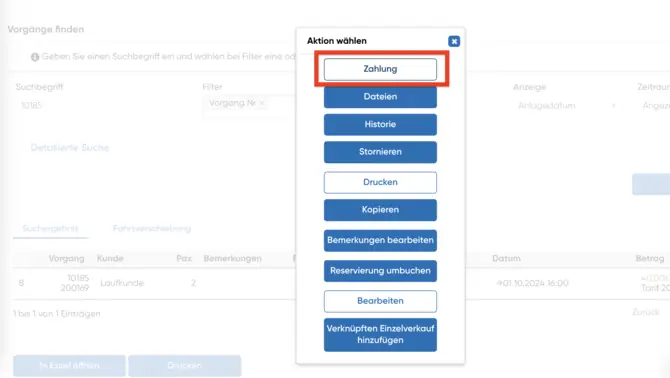
In the next step, select the "Payment" tab. Here you will find all the payment information linked to the transaction.
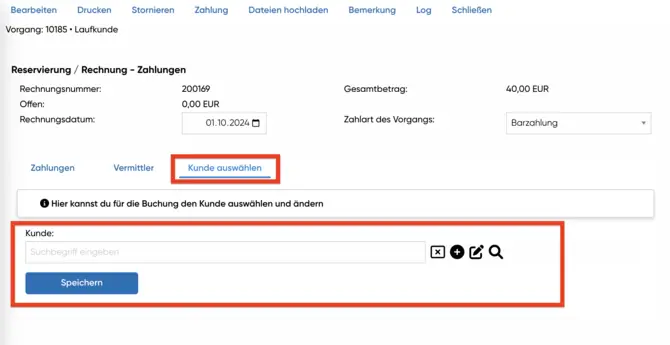
  • Search for the desired customer in the "Select customer" area.
  • You have the option of creating a new customer if the customer you are looking for does not exist.
  • Make sure that all details are correct before you save the changes.
Payment process
Payment process

Store customer
Store customer

Save customer information

Once you have selected the correct customer or created a new one, click on "Save". This saves the assignment of the customer to the booking.

  • Then check the booking details to ensure that everything is linked correctly.
  • A successful assignment enables precise tracking of payments and improves clarity in your system.